Read the system
Open device information in Settings and note the Android TV or Android version. Do not infer the system from the television brand.
If you are looking for an Xuper Hydra APK for Android TV, separate three questions first: is the device really Android TV, can you identify the source, and does the installation path make sense? This guide covers those checks without presenting an APK mirror as official or inventing a version.
Platform guide · external source not confirmed · reviewed October 9, 2026
 TV
TVSearches for Xuper Hydra for TV often mix Android TV, Google TV, TV Box devices, and phones connected by HDMI. They look similar from a distance, but the remote, focus system, resolution, storage, and installer path can differ. Start with the device you own instead of starting with a file name.
This page gives you a careful route for a TV or TV Box: identify the system, compare the app listing, review the source, and prepare an installation only when the details agree. The site keeps a separate download page for source review. It does not call a direct APK official because an unambiguous first-party publication was not confirmed.
The Android TV label describes a large-screen experience, but it does not guarantee remote control support for every APK. Some apps are made for touch input; others depend on a particular architecture or external service. If focus is missing, text is cut off, or permissions seem unrelated, stop and check the identity again.
The practical answer is simple: use this guide to decide whether the device and method fit, then use the source page to review details that may change. We do not call a version newest, official, or safe without a first-party source that supports that claim.
These checks help distinguish a generic TV Box from certified Android TV. The table is not a developer listing; it shows which fact you need before opening a file.
| Environment | Typical input | Priority check |
|---|---|---|
| Android TV or Google TV | Remote, directional pad, select button | The app states focus navigation and a compatible Android version. |
| TV Box with standard Android | Remote, mouse, or keyboard | System version, architecture, free space, and file-transfer method. |
| Smart TV without Android | Manufacturer remote | An Android APK is not a native app for another operating system. |
| Android phone or tablet | Touch screen | A documented mobile build; a TV label does not prove touch comfort. |
Open device information in Settings and note the Android TV or Android version. Do not infer the system from the television brand.
Leave room for the file, installation, and temporary data. A storage error is not fixed by downloading many copies.
Name, developer, package, date, permissions, and architecture should tell the same story before you accept an install.
These images help you recognize a large-screen layout: readable menus, separated sections, and controls that can be reached with focus. They are visual references, not proof that a downloaded copy is authentic.
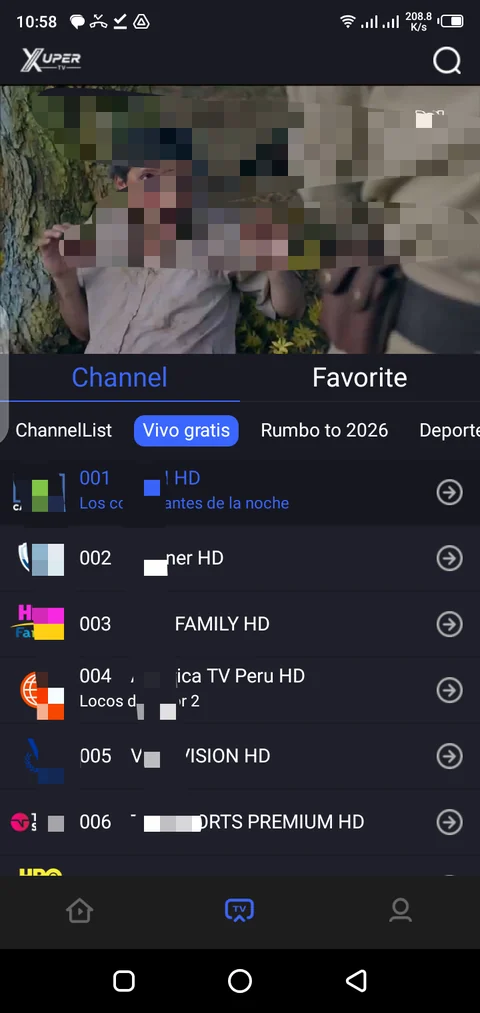
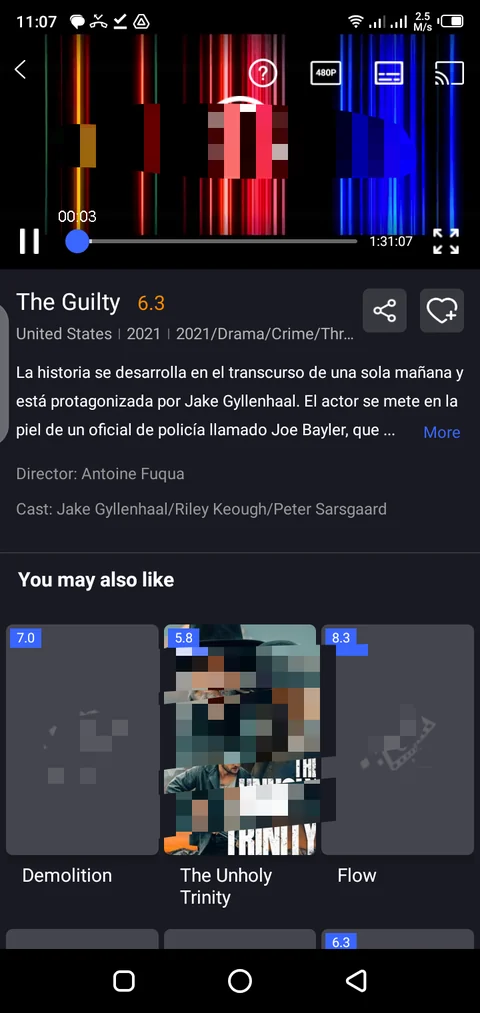
These images are topic-specific WebP media already available in the repository and are shown as editorial references. Always confirm the source and file version you intend to install.
The same file may open on one device and be awkward or incompatible on another. Use these differences to decide what information to request from the source.
Look for focus navigation, readable text from the sofa, and controls that work without touch. Check the minimum Android version and whether the listing mentions television.
Google TV adds an interface layer over Android TV. The system may install a compatible package, but the experience still depends on the app and its permissions.
One box may use standard Android, another architecture, or a different store. Check the CPU, version, storage, and whether a file manager is needed.
A mobile design can stay vertical, hide buttons, or lack focus. Test basic navigation and stop if the behavior does not match the listing.
Menu names vary by brand. The order below reduces mistakes and avoids enabling unknown sources without knowing which app will open the file.
In Settings, note the model, Android version, and free storage. For a TV Box, also record the architecture supplied by the manufacturer.
Open this site's download source page for the Android TV context and available external search. Compare the name, developer, and package; do not choose a mirror merely because it ends in .apk.
If a verifiable source provides an APK, use a repeatable method such as a browser, USB, or file manager. Confirm that the download finishes and the size is consistent.
Android may request permission for the browser or file manager to install packages. Enable it only for a source you recognize and turn it off again afterward.
Open the app, move focus, review permissions, and check whether the interface fits the screen. If behavior is unexpected, remove the copy and repeat the identity check.
A failure may come from the file, the system, or the interface. Change one variable at a time and avoid collecting copies from sources you cannot identify.
Check that the file is complete, the file manager has permission, and you are opening a real APK rather than an HTML page saved with another extension.
The package may be incomplete, use another architecture, or require a different Android version. Remove the copy and return to an identifiable source.
Check storage, system version, and permissions. Do not disable protections to force a launch or install several versions at once.
A mobile interface may depend on touch gestures. If there is no visible focus, look for documented TV support instead of changing mirrors.
Review display scaling and the app layout. An attractive screenshot does not guarantee that every menu fits your resolution.
External URLs change or expire. Return to the source review page and do not replace the link without checking the domain, file, and date.
Android TV compatibility is only one part of the decision. Keeping observed facts separate from assumptions helps you avoid the wrong file.
It cannot be guaranteed. Check the Android version, architecture, storage, and remote navigation. An APK may install and still have a mobile interface or rely on an external service.
Android TV or Google TV is usually integrated into the television and designed around a remote. A TV Box may use standard Android, another architecture, and another transfer method. Check the exact model.
The site's download page opens the available source context and an external search. It does not confirm that every result belongs to the developer; compare the specific listing before installing.
It may install and still be awkward or incompatible. If the app relies on gestures, portrait orientation, or touch buttons, look for TV-specific documentation first.
This guide does not publish a latest-version claim because an unambiguous first-party source was not confirmed in the review. Compare any mirror number with a verifiable publication.
Identify which app is trying to install the file and review the unknown-source permission. Enable it only for a source you recognize, then disable it after the install.
Some interfaces are built for touch and expose no TV focus. Do not solve this by installing random copies; look for documented compatibility or use the intended device.
No. It is an independent platform and source-checking guide. We do not host a confirmed APK or claim an official relationship with the developer.
Once you know which system and remote you have, open the download page to review the available external source. If developer, package, or version details are missing, keep that uncertainty visible instead of turning a quick link into a promise.